

Black Horse Excellence

Fixed Asset Register with Perpetual Depreciation Calculator

The Fixed Asset Register with Perpetual Depreciation Calculator is an Excel-based solution designed to simplify depreciation calculations as per Schedule II of the Companies Act, 2013.

Whether using the Straight Line Method (SLM) or Written Down Value (WDV), the tool automates complex calculations while preparing detailed fixed asset schedules.

It captures category-wise opening balances, additions, deletions, depreciation for the year, and closing balances with complete accuracy.

Built to handle large volumes of assets and frequent movements, the tool also calculates gains or losses on asset disposals, manages revaluation impacts, and adjusts depreciation for capital subsidies.

With flexible options for monthly, quarterly, half-yearly, or yearly reporting, it provides firms with a dynamic and reliable fixed asset dashboard. By reducing manual effort and ensuring compliance, it delivers standardised, audit-ready results while saving valuable time.

DEPRECIATION TOOL

Depreciation Calculation tool for Schedule II of the Companies Act, 2013

Do you download Excel template for Companies Act depreciation calculation for each year ?

Do you upload opening balance, addition, deletion in each year in different templates ?

Problem of calculating depreciation year on year is over. Here comes perpetual depreciation calculator.

This tool has been designed after intense research on application of time value of money concept to WDV depreciation calculation. This tool has been tested on several scenarios to cover all exceptional cases. Add basic details of assets and rest all is automatic, depreciation calculation, gain/loss on sale of assets, capturing it in the Fixed Asset schedule.

PRICE- LIFETIME INVESTMENT COST

₹ 1,999 

Entries upto 5000 line items

₹ 4,999

Entries upto 25000 line items

KEY FEATURES

Why Thousands of CAs Trust Black Horse

Developed to simplify asset management and ensure accurate compliance, the tool brings together essential functions that reduce manual work, handle complex calculations with ease, and deliver reliable results for every reporting need.

Automated Depreciation

Accurately calculates depreciation under both SLM and WDV methods, fully aligned with Schedule II of the Companies Act, 2013.

Comprehensive Fixed Asset Schedule

Generates detailed schedules with category-wise opening balance, additions, deletions, depreciation, and closing balance automatically.

Flexible Reporting Options

Supports depreciation calculation for monthly, quarterly, half-yearly, or annual reporting needs.

Advanced Adjustments & Transitions

Handles asset revaluations, capital subsidy impacts, and smooth transition between SLM and WDV with retrospective effect.

BENEFITS

Why Thousands of CAs Trust Black Horse

Accurate Compliance

Ensures depreciation is calculated strictly as per Schedule II of the Companies Act, 2013.

Time Efficiency

Automates complex calculations and schedules, saving hours of manual work.

Detailed Reporting

Generates fixed asset schedules with opening balance, additions, deletions, depreciation, and closing balance.

Error Reduction

Eliminates formula mistakes and manual inconsistencies, improving reliability.

Flexible Period Options

Supports monthly, quarterly, half-yearly, or annual depreciation reporting.

Handles Complex Scenarios

Manages revaluations, subsidies, and retrospective adjustments with ease.

Transparent Asset Tracking

Maintains a dynamic fixed asset register and dashboard for better visibility.

Audit-Ready Output

Produces standardised, professional schedules that are ready for review and scrutiny.

PDF OVERVIEW

Sample-FS_Schedule-3-Tool-for-Companies

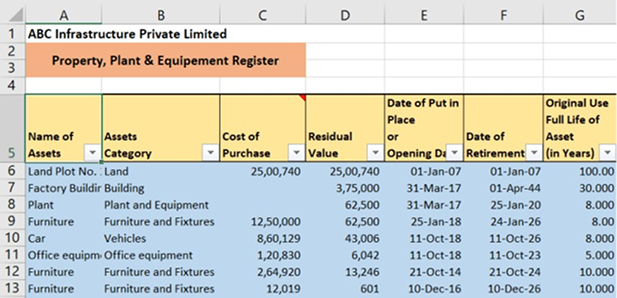
This is excel based tool wherein user needs to enter only below basic details of assets,

  • Name of Assets
  • Assets Category
  • Cost of assets
  • Residual Value
  • Date of Put in Place
  • Date of Retirement
  • Original useful Life of assets

Rest all tool takes care. You can play with the data with just click of button to get Depreciation as per,

  • SLM
  • WDV
  • Monthly
  • Quarterly
  • Half yearly
  • Yearly
  • Summary as per Schedule III captured automatically for any selected year(Opening balance, addition, disposal, depreciation during the year, closing balance)
  • In case, where asset is sold, gain/(loss) is also computed by the tool.
  • Using this tool first time, you can enter opening balances(Gross Block, Accumulated depreciation) to make transition easier.
  • This tool is very near to Fixed Asset register including depreciation calculation.
  • Maintain your end number of companies Fixed Asset Register start at just Rs. 1,999 for perpetually.
RELATED VIDEOS

Why Thousands of CAs Trust Black Horse

Import ITR BS, P&L to CompuTax Software

Balance Sheet Automation Tool is enabled with preparation of ITR 3 & 5 Balance Sheet, Profit and Loss account, Trading and Manufacturing Account.
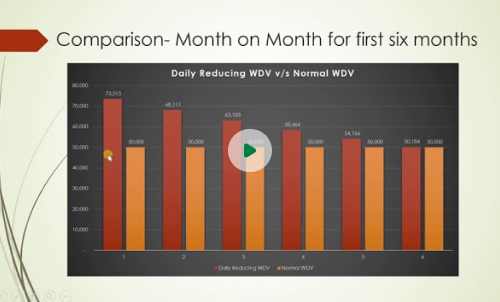
Presentation of WDV Depreciation using Time Value of Money Concept

This video is on Impact analysis of WDV Depreciation using Time value of Money Concept vs Normal WDV Depreciation.
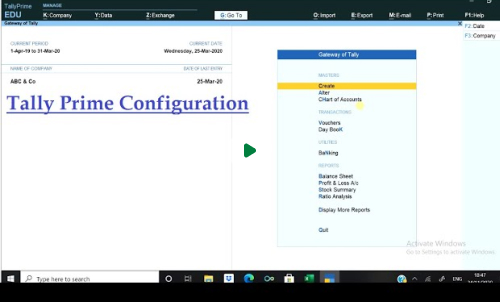
Configuration Settings in Tally Prime

This video is on first time Configuration required to be done in Tally Prime to Import data from Tally Prime to Schedule 3 & Balance Sheet Automation Tool.
FAQ’S

Frequently Ask Questions

Discover More About Our Excel-Based Automation Tools You can adjust the tone or visuals to match your website’s style. Let me know if you’d like refined copy or tailored visuals!
What is included in the Combo Tool?
The Combo Tool includes Schedule 3 with Fixed Asset Register and Depreciation Tool, along with two additional add-ons: the Consolidation Tool and the Ageing Tool.
Do I need to buy the FAR tool separately?
No, when you purchase any of our tools, the FAR Depreciation Calculator is included.
Does this tool calculate depreciation as per the Income Tax Act?
Yes, in both the Schedule 3 and Balance Sheet tools, the FAR tool calculates depreciation as per the Income Tax Act.
Does this tool calculate Deferred Tax?
Yes, the tool automatically calculates deferred tax based on entered data and allows for additional timing differences for deferred tax adjustments.
Can we prepare Cash Flow Statements in this tool?
Yes, Cash Flow Statements can be prepared simply by completing grouping in the Trial Balance.
The tool integrates with popular ITR software (like Computax, Winman, Genius, etc.) to eliminate redundancy in tasks such as grouping, allowing you to import the ITR directly from our tool into the respective software.
Scroll to Top